
Agents I run, and
agents I'll build for you.
Some of these run my own business every day. The rest are jobs I can build for you. If yours isn't here, tell me the problem.
What runs right now
A few of the agents running right now.
Social posting agent
Every Sunday it drafts my week of posts for three platforms, checks them against my writing rules, and emails me one approval. I read, click approve, and it schedules them. About 10 minutes a week.
What it saves: writing and scheduling posts by hand.
Missed-call text-back
When a call rings out, the caller gets a text from the business number within seconds. It asks what they need and books the job into your calendar.
What it saves: calls that would have gone to voicemail.
My CRM and text inbox
I built the system I run my sales on: a pipeline, my contacts and a live inbox of every conversation my text agent has. Built in weeks.
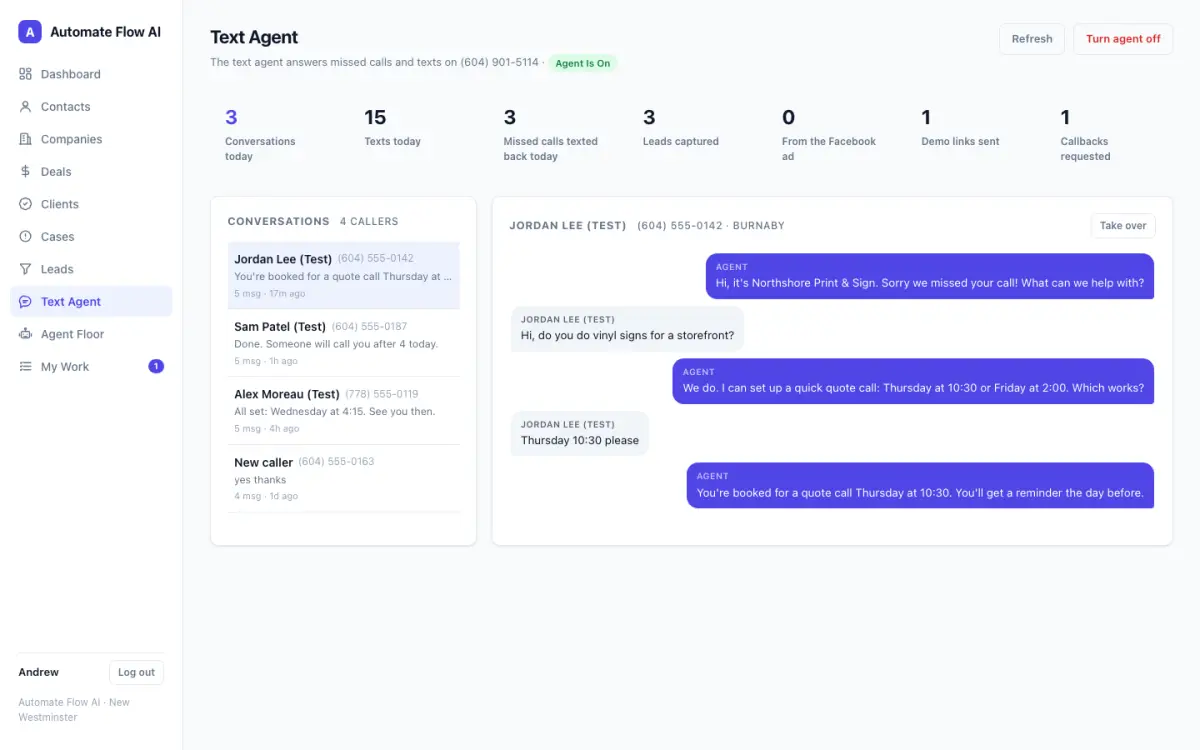
Built as demos for prospects: a walk-in queue app for a barbershop · a missed-call front desk for another shop's phone line, set up in 48 hours
Example jobs I can build for you
Each one is set up for your tools and your wording.
Leads that slip
How it works
- Someone fills in your website form.
- They get a text and an email within seconds, with times to book.
- The booking lands in your calendar.
Connects to: your website form, your calendar, email and text.
You stay in control: You set the wording and the booking times.
How it works
- A new enquiry arrives by form, text or email.
- It asks your questions and sorts good fits from the rest.
- Good fits get a booking link.
Connects to: your inbox, forms, calendar and text.
You stay in control: You write the questions and decide who counts as a fit.
How it works
- You send a quote.
- It nudges on day 2, 7 and 14 until you hear yes or no.
- Every reply comes to you.
Connects to: your quoting or job software, email and text.
You stay in control: You set the timing and the limits, and you can stop it any time.
Customers and reviews
How it works
- You mark a job or visit done.
- A few hours later the customer gets a text with your review link.
- Unhappy replies come to you privately first.
Connects to: your job or booking software and text.
You stay in control: You choose the wording and when it sends.
How it works
- It finds customers you haven’t seen in a year.
- It sends each one a friendly check-in, spaced out.
- Replies come to you.
Connects to: your customer list, email and text.
You stay in control: You approve the message and the list. Every message has a working opt-out.
How it works
- A service or renewal date comes up.
- The customer gets a reminder with a one-tap booking link.
- The booking lands in your calendar.
Connects to: your customer records, your calendar, email and text.
You stay in control: You set the timing and the wording.
Marketing that runs itself
How it works
- You drop in photos and quick notes about your work.
- It drafts a week of posts in your voice.
- You approve them in one email, and they schedule.
Connects to: a shared folder, your email and your social scheduler.
You stay in control: Nothing posts until you approve it.
How it works
- Each month it collects what you did.
- It drafts a short newsletter in your voice.
- You review and send it.
Connects to: your notes or job records and your email list tool.
You stay in control: You approve every send, and the list only includes people who agreed to hear from you.
Inbox and paperwork
How it works
- A message arrives in your shared inbox.
- It drafts a reply and flags the urgent ones.
- You review before anything sends.
Connects to: your email.
You stay in control: Nothing sends without your OK, and you set the rules for what counts as urgent.
How it works
- A form, PDF or photo arrives.
- It reads the details and fills in your system.
- Anything it’s unsure about comes to you.
Connects to: your email, a shared folder and your spreadsheet or database.
You stay in control: You see anything unclear before it goes in.
How it works
- You finish a call and add your notes.
- It pulls out the follow-ups and who owns them.
- You confirm them, and they go into your CRM.
Connects to: your notes and your CRM or task list.
You stay in control: You confirm each task before it’s created.
Scheduling and no-shows
How it works
- A booking is confirmed.
- The customer gets reminders, and an easy way to reschedule.
- Your calendar updates.
Connects to: your calendar, email and text.
You stay in control: You set how many reminders go out and when.
How it works
- A customer asks for a time.
- It offers slots that are really open in your calendar.
- The confirmed booking appears where you already look.
Connects to: your calendar, email and text.
You stay in control: You decide which slots are available.
Tools that don’t talk
How it works
- You enter a job or customer in one tool.
- It copies the details into the others.
- It flags anything that doesn’t match.
Connects to: the tools you already use, such as your CRM, accounting and calendar.
You stay in control: You choose which fields sync, and conflicts come to you.
How it works
- A job is booked.
- It tracks it through done, invoiced, reminded and paid.
- You get a flag if anything stalls.
Connects to: your booking or job software, your accounting tool, email and text.
You stay in control: You set the reminder timing and who gets flagged.
How it works
- Every week, on a schedule, it pulls your numbers from your tools.
- It builds the report.
- It emails it to you and anyone you choose.
Connects to: your accounting tool, CRM, booking software or spreadsheets.
You stay in control: You choose the numbers and who receives it.
If your team does it by hand on a computer, I can probably build an automation for it.
Not every job fits a list. If something eats your week, describe it and I'll say how I'd build it and roughly what it takes.
Portals
A place where customers or staff log in to book, pay or upload.
Dashboards
Your numbers in one place, updated on their own.
Internal tools
The app your team needs, built around how you actually work.
Connecting systems
Two tools that should talk to each other, finally doing it.
Custom pricing applies. Every custom build is quoted from real hours after a fit call.
Good things to know
Can you build something that isn't on this page?
How long does a project take?
Do we need to switch tools?
What does it cost?
Is our data safe?
Don't see your problem? Tell me.
On a 10-minute call I'll tell you whether it's worth building, buying, or leaving alone.
Answer and follow up
Missed calls, web leads and quotes answered for you.
Connect your tools
One entry, every app updated.
Build what you can't buy
A portal, dashboard or system built to fit.
How builds work → · Rather talk to a person? Text or call Andrew: 604-901-5114